

 By
By Building an app like Practo is not just about putting doctor profiles up and allowing appointment booking. It involves creating connected experiences for patients, doctors, and administrators, backed by online consultations, secure payments, digital prescriptions, notifications, and health information management.
A Practo clone app development project also requires market research, workflow planning, UI/UX design, technology selection, healthcare integrations, security testing, and launch preparation.
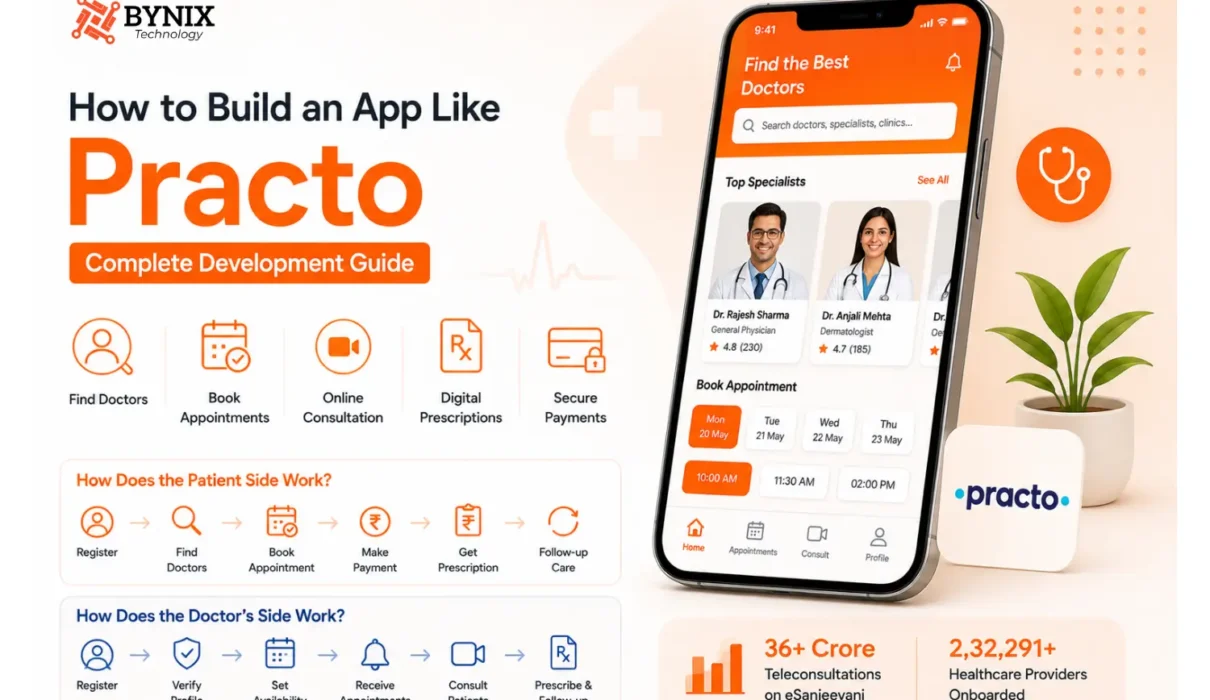
India’s growing digital healthcare adoption highlights the opportunity. As per the Government of India, eSanjeevani had completed over 36 crore teleconsultations by April 6, 2025, and there were 2,32,291 healthcare providers already onboarded. This healthcare mobile app development guide explains how to plan, build, test, and launch a Practo-like platform.
What is a Practo-like app and how does it work?
Before you start actual development, take a moment and get clear on what you are really building. A Practo-style application usually turns into a multi-sided healthcare platform. It assists patients in finding healthcare professionals and services, while also giving providers digital tools for handling appointments and consultations.
Practo currently comes with doctor discovery, in-clinic appointment booking, online consultations, and a few other healthcare offerings. Its provider ecosystem also covers solutions for doctors, clinics, and hospitals.
A new product doesn’t have to repeat the whole ecosystem exactly. It just needs to figure out which part of the model it can tackle particularly well.
How does the patient side work?
Most patients start by registering, then they browse around, find doctors, compare profiles, check availability, make a booking, pay online, show up for the consultation, pick up prescriptions, and finally arrange follow-ups, all in one connected flow that feels simple.
How does the doctor’s side work?
Doctors also begin with registration; they finish verification, then they build their profile, manage availability, get incoming appointments, consult patients, record notes, issue prescriptions, and deal with follow-up steps, using a smoother provider dashboard.
How does the Admin Side work?
The admin dashboard connects to the marketplace.
Admins may need to handle a lot of little things, like:
- Patient accounts
- Doctor verification
- Provider profiles
- Appointments
- Payments
- Reviews
- Complaints
- Content
- Notifications
- Platform settings
How do you build an app like Practo, step by step?
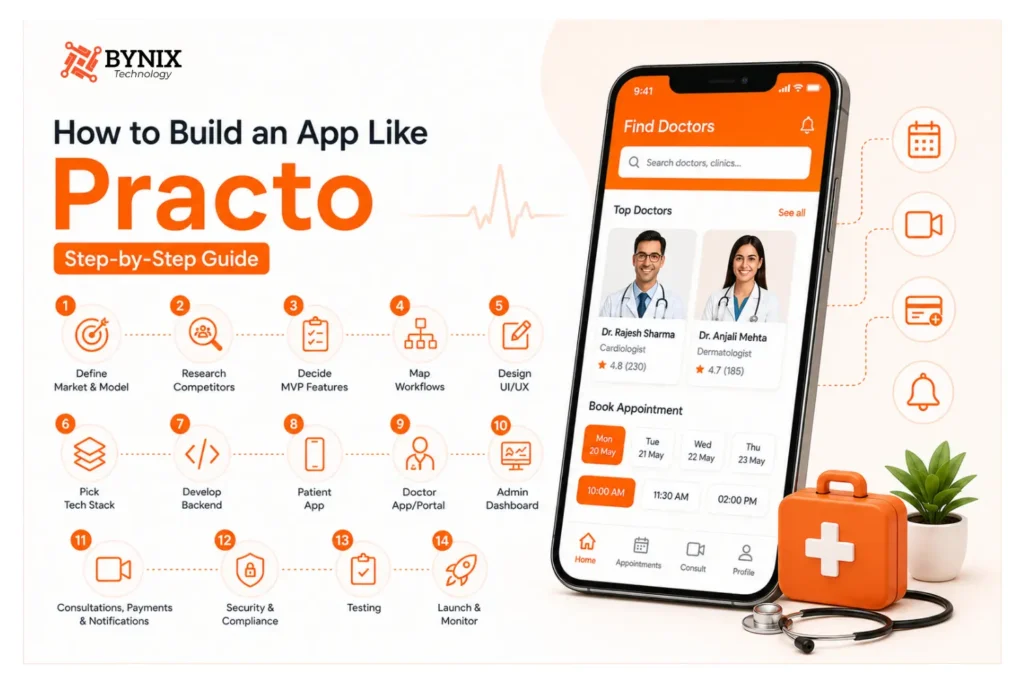
You should think about the development process in stages, rather than starting with individual screens.
Step 1: Define Your Target Market and Business Model
Before anything, describe the demographic your app will target and the gap in the market that your app will fill.
Examples of holes in the market include:
- Doctor/Specialist Discovery
- Online Consultations
- Clinic/Appointment Bookings
- Chronic Disease Management
- Specialist/Location Focus
- Employer Healthcare
Then choose how the app will fund itself:
- Appointment Booking
- Consulting Booking Commissions
- Charging Doctors Subscription
- Charging Clinics Subscription
- Charging Patient Membership
- Offering Featured Listings
Your business model will influence the features and payment system you build, as well as the framework of your app.
Step 2: Research Competitors and Identify Your USP
Learn how other healthcare apps manage the following:
- Searchable doctor profiles
- Doctor availability and scheduling
- Online consultations
- App payments
- Reviews
- Doctor and staff onboarding
- Patient record management
- App-based follow-up requests
Practo offers online consultations with over 20,000 verified doctors (across over 25 specialty areas). Use this benchmark to identify your USP by defining what gaps currently exist.
Step 3: Decide the MVP features
The MVP should give the main value, without trying to turn into a full healthcare ecosystem right away.
For a practical first version, you could start with a small set like,
- Patient registration and login
- Doctor registration
- Doctor verification
- Doctor profiles
- Search and filters
- Availability management
- Appointment booking
- Cancellation and rescheduling
- Online consultation
- Payments
- Notifications
- Digital prescriptions, or consultation documents when applicable
- Patient consultation history
- Ratings and reviews
- Admin dashboard
What should not necessarily be in the MVP?
Basically, advanced features can wait until the core workflow has been properly validated.
Examples include:
- AI-powered health assistants
- Wearable integrations
- Remote patient monitoring
- Pharmacy marketplace
- Laboratory marketplace
- Complex insurance processing
- Advanced health analytics
- Membership programs
Step 4: Map Patient, Doctor, and Admin Workflows
Before developing the application, it’s imperative to draw out each user journey in order to keep the application simple and to identify any gaps in the requirements.
- Patient: Registration, Search Doctor, Profile, Appointment, Payment, Confirmation, Consultation, Prescription, Follow-Up
- Doctor: Registration, Verification, Profile, Appointment, Consultation, Prescription, Follow-Up
- Admin: Verify Doctor, Profile, Approval, Monitor Appointments, Payments, Complaints, Reports
The workflows help the development team understand the requirements of each user on the application.
Step 5: Design UI/UX
Clarity and visual complexity are especially true in healthcare.
Patient Interface
- Find Doctor
- View Availability
- Book
- Pay
- Consultation
- Health Information
- Doctor Interface
- Appointments
- View Availability
- Patient Info
- Tools for Consultation
- Prescriptions
- Follow-Up
- Earnings
- Admin Interface
Design for healthcare trust
The interface should clearly communicate, in a simple way:
- Doctor qualifications
- Verification status
- Consultation fees
- Appointment timing
- Cancellation policies
- Payment status
- Privacy information
Try not to design the application like a generic marketplace. Healthcare users usually need that extra sense of certainty before they share any personal details or actually book a care visit.
Step 6: Pick the Tech Stack
The tech stack should be chosen based on the product’s actual needs, anticipated scale, required integrations, and available development resources.
A possible stack could include:
| Layer | Possible technologies |
| Mobile application | Flutter or React Native |
| Web dashboard | React or similar framework |
| Backend | Node.js, Java, Python, or similar |
| Database | PostgreSQL or another suitable database |
| Cloud infrastructure | AWS, Azure, Google Cloud, or equivalent |
| Video consultation | WebRTC or secure communication infrastructure |
| Notifications | Firebase Cloud Messaging and native services |
| Payments | Region-specific payment gateway |
| Analytics | Product analytics and monitoring tools |
Build an API-driven backend:
The backend should allow for multiple interfaces rather than binding business logic to a single app.
Similarly, the same core services should be able to support:
- Patient mobile apps
- Doctor mobile apps
- Web applications
- Admin dashboards
- Clinic portals
- Future partner apps
The architecture should also allow new healthcare services to be added without having to rebuild the entire system.
Step 7: Develop the Backend
The backend is the most important place to coordinate the workflows for the healthcare services.
Some of the core services may be:
- Authentication
- User roles
- Doctor profiles
- Provider verification
- Availability
- Appointment scheduling
- Consultation management
- Payments
- Documents
- Notifications
- Reviews
- Reports
Appointment scheduling is especially important.
The system should provide the following:
- The ability to set provider availability.
- The ability to create appointment slots.
- The ability to show the available slots to patients.
- The ability to hold a slot as chosen.
- The ability to finalize a booking.
- The inability to book the same appointment time.
- The ability to set provider availability.
- The ability to send notifications.
- The ability to manage the cancellation and rescheduling of appointments.
Failures within this system could cause significant problems in day-to-day operations. It could lead to more than one patient being scheduled for the same appointment time.
Step 8: Design the Patient Application
The patient application should be developed based on the real patient pathway, not in isolation of features.
Essential patient screens
These may include:
- Welcome and onboarding
- Registration/login
- Home
- Doctor search
- Search filters
- Doctor profile
- Appointment calendar
- Booking confirmation
- Payment
- Upcoming appointments
- Consultation
- Prescriptions
- Consultation history
- Notifications
- Profile and settings
The home screen should offer one-click access to the most frequently used actions.
A patient who has already booked an appointment in the past should not have to search for a new doctor. The interface should account for that behavior.
Step 9. Doctor App or Portal Construction
The vendor application must have functionality for the operational aspect of health service delivery.
Doctors must be able to:
- Create and edit their profiles
- Add and edit their qualifications
- Set their consultation fees
- Set and edit their consultation times
- Edit their block and available times
- View their upcoming appointments
- Edit their appointments
- Enter consultations
- Access the patient data for the consultation
- Add notes to the consultation
- Send digital prescriptions (if authorized to do so)
- Set follow-up appointments
- Check their total income
Practo’s tools for providers provide evidence that management of both doctors and clinics can gain traction as an independent product.
Step 10. Creation of Admin Dashboard
An admin dashboard should not be viewed as an addition that can be built later.
It should control the operational aspect of the platform.
Important Admin Capabilities
- Verification of doctors
- User and Profile control
- Appointment and Payment Control
- Refund and Complaint Control
- Review and content control
- Analytics
- Audit Control
Step 11: Online Consultations with Payments and Notifications Integrated
Design an online doctor consultation app that integrates online consultations, payments, and notifications in one seamless workflow.
Consultation workflow:
Book — Pay — Confirm — Reminder — Video/audio/chat — Prescription — Follow-Up
Payment functionalities:
- Payment for online consultations and appointments
- Refunds and failed payments
- Receipts
- Payouts to doctors
Notifications:
- Confirmation for booking a consultation
- Appointment reminders
- Notification for cancellations of appointments and/ or rescheduling
- Payment notifications
- Consultation notifications
- Follow-up reminder notifications
Step 12: Put Security and Compliance in place
Healthcare data needs careful handling, not just technically.
The platform can end up processing quite a range of things like:
- Personal information
- Contact information
- Appointment details
- Consultation records
- Prescriptions
- Uploaded medical documents
- Payment information
So security should be treated as part of the architecture from the very start, not a later add-on or afterthought.
Core security measures
Think about:
- Encryption when data is in transit and at rest
- Strong authentication
- Permissions that depend on role
- Least privilege permissions
- Secure API authentication setup
- Audit trail logging
- Protected document storage area
- Backup and recovery plan
- Vulnerability testing
- Monitoring plus incident response
Step 13: Application Testing
It is common to test the application even during the early stages of development to see if it is secure, reliable, and also genuinely easy to use.
Do some checks on the main app functions, like:
- Patient Registration, Doctor Search
- Booking appointments and handling payments
- Canceling appointments, then rescheduling if needed
- Online consultations, for real-time guidance
- Prescriptions and notifications delivery
- Availability and management of appointments in general
- Doctor registration as well as control over earnings
That way you can spot issues sooner, instead of waiting for later stages. Test the bookings that could cause a problem, like double booking, payment failures because of spotty internet, interrupted consultations, and the odd unauthorized access.
Step 14: Launch and Monitor the MVP
Focusing on a single market at the outset allows you to test the product and collect early behavior data to iterate on the product before you scale.
Start with:
- One market: Choose a geographic market that allows you to reach patients, doctors, and other healthcare professionals while operational efficiency is being managed.
- A few specialties: Focus on specialties that are in higher demand and maintain consistency in availability and constant demand for appointments.
- Quality verified doctors: Get quality doctors on board to create trust with the patients and also maintain the quality of the consultation services.
- Core booking and consultation services: Provide the doctor directory, appointment booking, online consultations, payment, notifications, and digital prescription.
After launch, focus on bookings, cancellations, completed consultations, repeat usage, patient and doctor retention, and revenue to drive improvement.
What Are the Essential Practo-Like App Features?
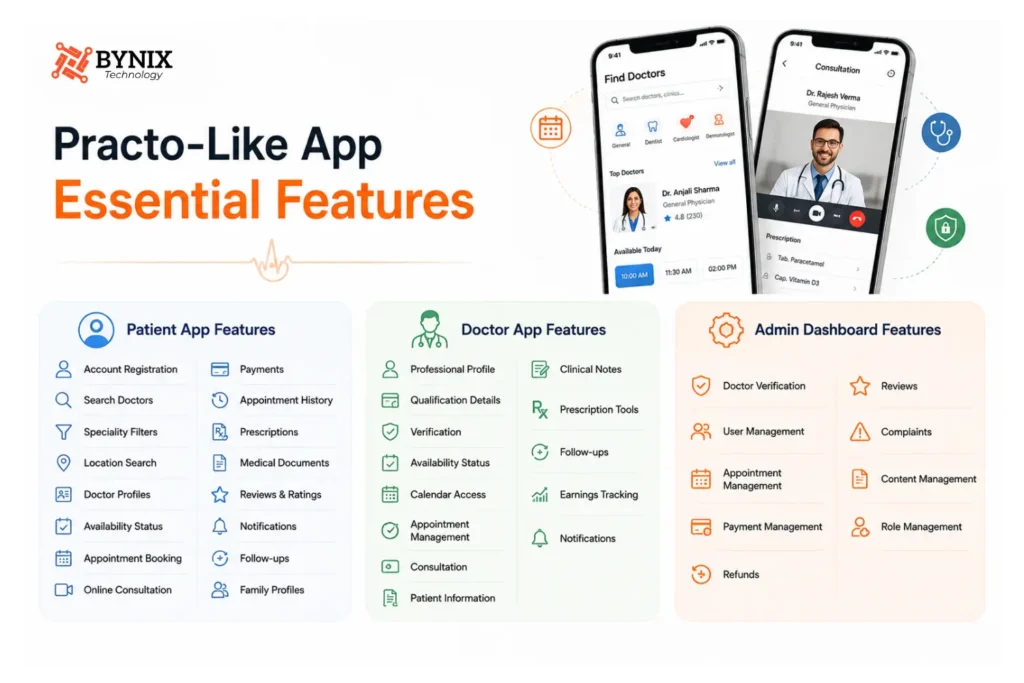
The Practo-like app features should match patient needs and your business model, like doctor search and profiles, booking consultations, payments, prescription records, and notifications.
Patient app features
For example, the patient application could have things like:
- Account registration
- Search for doctors
- Speciality filters
- Search tied to location
- Doctor profiles
- Availability status
- Appointment booking
- Online consultation
- Payments handling
- Appointment history
- Prescriptions section
- Medical documents area
- Reviews from other patients
- Notifications alerts
- Follow-up management tasks
- Family profiles and related linked accounts
Doctor App features
The provider side can include:
- A professional profile
- Qualification details
- Verification section
- Availability status
- Calendar access
- Appointment management
- Consultation area
- Patient information
- Clinical notes
- Prescription tools
- Follow-ups
- Earnings tracking
- Notifications
That’s basically the core set of things you’d see.
Admin Dashboard features
The admin side can include:
- Doctor verification
- User management
- Appointment management
- Payment management
- refunds
- Reviews
- Complaints
- Content management
- Role management
Advanced Features to add after MVP
- Family health care management
- Lab test booking
- Medicine ordering
- Remote patient monitoring
- Wearable integration setup
- AI-assisted admin workflows
- Personalized health content feed
- Subscription plans and renewals
- Insurance integration
- Clinic management overview
- Health record interoperability and sharing
What Does It Typically Cost To Make An App Similar To Practo?
The cost to build an app like Practo is between $40,000 and $200,000 or more. This price varies depending on the app’s features, integrations, security, the number of platforms it’s built for, and the location of the development team.
A doctor search with an appointment booking system, the ability to make payments, and conduct virtual consultations is a basic MVP. A more comprehensive app with multiple suites of healthcare tools built for multiple users with the ability to manage complex records with many integrations will cost more.
The final price should reflect the scope of work needed to make the app.
Glance Here: – Doctor Appointment App Development Cost: Complete Pricing Breakdown (Doctolib-Style)
What Is the Development Timeframe for a Practo-Like App?
Developing a Practo-like app takes anywhere from four to nine months. Features, integrations, and platforms all impact development time. A smaller application with the minimum viable product (MVP) features such as a searchable database of doctors, appointments, payments, and online consultations would take three to five months.
A larger application integrating advanced healthcare features, multiple platforms, AI, and several city-contiguous operations would take at least nine months. UI/UX design, backend development, and testing all add to the development time. The timeframe for regulatory, user security, and compliance requirements also affects development time.
How Do You Pick a Medical App Development Company?
Choosing the right medical mobile app development company is a big deal because healthcare apps deal with sensitive data and intricate workflows. Don’t just grab a vendor based on price only, because that can feel too simple. Look for healthcare know-how, solid technical skills, strong security practices, and a good long-term support plan. Also check how they handle compliance, and what their ongoing maintenance looks like.
Before you make a decision, think a bit:
- Healthcare experience: Look at prior healthcare applications, case studies, and live products too.
- Security: Ask how patient data is encrypted, kept, and defended from unauthorized access, in real terms.
- Compliance: Check whether the team really understands the healthcare regulations that apply and the privacy expectations.
- Technical expertise: Look for experience with APIs, EHR systems, HL7 / FHIR, cloud infrastructure, mobile development, and third-party integrations in general.
- Testing: Make sure there is functional testing, security testing, performance testing, and usability testing all in there.
- Post-launch support: Ask how they handle maintenance, new releases, bug fixes, and security patches after go-live.
What Should You Add After Launch?
Once the MVP starts to gain users, you should use feedback plus product data to figure out what features should come next. Avoid overly complex functionality to keep up with competitors; it sounds tempting, but it usually backfires.
You might consider expanding with things like
- Family profiles: Let users handle appointments and keep health information for family members
- Lab and pharmacy services: Help connect patients with diagnostic testing options and medicine providers and want to know about Medicine delivery app development cost.
- Health records: Offer a single, central spot where users can reach prescriptions, reports, and consultation history.
- AI-powered features: Bring in AI to help with appointments, patient intake, information search, or admin-related workflows if it actually fits.
- Doctor tools: Add practice analytics, automated nudges, follow-up handling, and clinic management elements.
- Personalized care: Support reminders, follow-ups, and health tracking tailored to what the user needs.
In practice, this way the platform can grow from real patient and doctor needs rather than crafting every single feature right from the beginning.
In Conclusion
Making a Practo-like really begins with getting a clear grip on your target users, healthcare workflows, business model, and what you want as your MVP scope. So from doctor discovery and appointment booking to online consultations, payments, and handling secure health information, each small feature should line up with a practical user need.
A well-planned telehealth app development guide can help you turn the initial concept into a secure and scalable product, without bringing in extra complications.
If you’re ready to launch your healthcare platform, connect with an experienced app development team today, and let your idea become a market-ready app.
Frequently Asked Questions About Building an App Like Practo
What are the 7 steps to creating an app?
The seven main stages in app development are strategy and discovery, planning, UI/UX design, coding and app development, testing and quality assurance, deployment and launch, plus ongoing maintenance. Together they influence an app from the first idea, through building, release and later enhancements, and into long-term support.
What are some Practo alternatives for doctors?
Can I construct an app like Practo without incorporating all of Practo’s features?
Of course. A startup can develop an MVP with key features like finding a doctor, appointment booking, and online consultations. Building less initially can help in validating the demand for that feature before investing in advanced healthcare services.
How can a new health app compete with Practo?
Taking on Practo with the same number of doctors and functionalities will be very hard. A better approach will be to target underserved specialties, locations, languages, patient segments, or healthcare service workflows, and provide a better service compared to the competition.
Should I build different applications for patients and doctors?
Separate applications would be more appropriate because patients and doctors have completely different workflows. For the first version, a patient application could be built with a responsive doctor portal built on the same platform, with a goal of simplifying the first version of the application.
What integrations do I need for a Practo-like application?
Integrations may vary based on your business model. Common integrations include payment gateway providers, video consultation solutions, mapping, notifications, identity verification systems, health information systems, and healthcare APIs. Consider integrations necessary for your MVP.